administrators > Dashboard > The admin dashboard
The admin dashboard
Presentation
The “Admin Dashboard” is accessible from the main menu: Admin > Admin dashboard
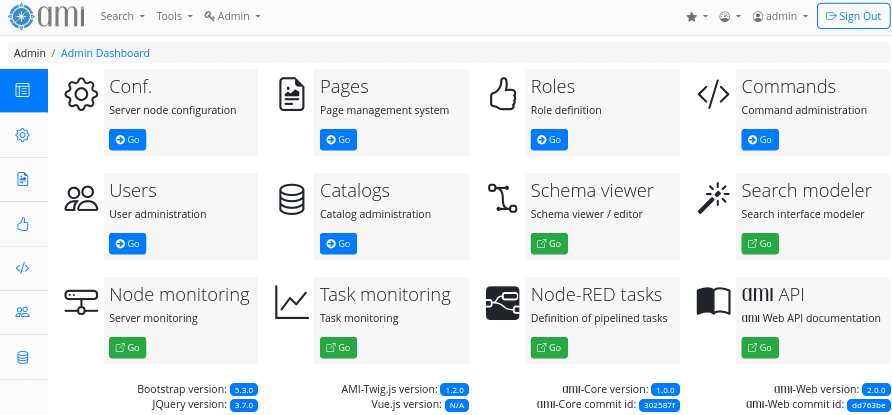
Figure 1. The administration dashboard
The administration dashboard is the central page where an administrator can configure the AMI ecosystem to fits end-users needs. All administration tools are grouped here:
Conf.
The nodes that host the ecosystem can be configured from this interface, including pools, caches, emails, external authentication services, and more.
Pages
This is the page editing tool used to customize the AMI website for end-users.
Roles
This tool lists the predefined roles within the ecosystem and allows administrators to define new ones. Roles are used to authorize end-users to execute a specific subset of commands.
Commands
This tool lists the predefined commands within the ecosystem and allows administrators to declare new ones.
Users
The end-user management tool allows administrators to control user access and permissions within the system.
Catalogs
The catalog administration tool enables administrators to manage the databases referenced by the ecosystem.
Schema Viewer
This tool displays a graph of the database referenced by the ecosystem, providing administrators with a clear understanding of the data structure. It also allows them to browse the data and configure how it will be displayed after an end-user search and selection. It is also accessible from the main menu: Tools > Schema Viewer
view more…Search Modeler
This tool allows administrator to modelize the search tool that will be provided to end-users. It is also accessible from the main menu: Admin > Search Modeler
view more…Node monitoring
This tool allows administrators to model the search tools that will be provided to end-users.
Task monitoring
The tool for declaring, stopping, starting, and monitoring metadata aggregation tasks.
Node-RED Tasks
The tools for graphically designing pipelines of aggregation tasks.
AMI API
Link to an obsolete AMI Web Framework API documentation.
- Prev
- SubApp