Concepts > Language > MQL
Introduction
What is MQL ?
MQL is a domain specific language for executing queries on a Relational DataBase Management System (RDBMS) closely to spoken language. Initially proposed by gLite, a middleware project for grid computing at LHC experiments, the specification was extended by the AMI team.
Why using MQL?
Database experts use SQL for querying data, having the knowledge of the database structure that is usually hidden to end-users. Dedicated to non-experts, MQL provides a way for querying data with a simplified syntax less prone to error.
A concrete scenario
You are the boss of the “AMI Music” resellers company. All the commercial data are store in the following database schema:
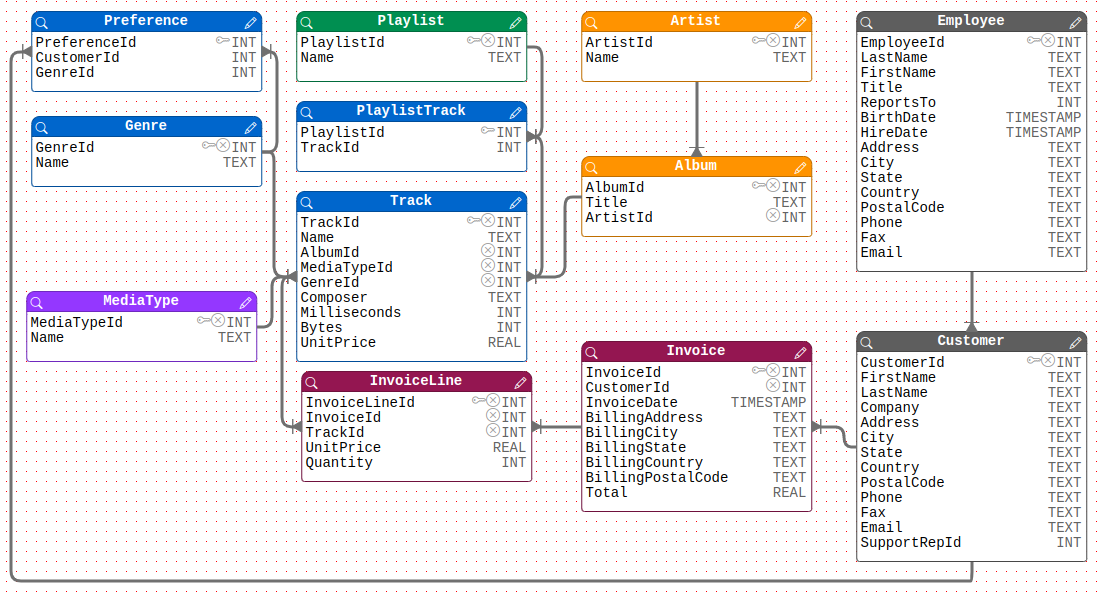
Figure 1. Database schema
This schema represents how the various information are structured and linked.
- Your company has employees who take care of your customers.
- Your customers could buy tracks from album of various artists.
- Your customers have some preferences concerning their favorite music genres but of course could buy any track.
As the boss, you would like to answer the following question:
Who are my employees taking care of ‘New-York’ city customers?
The 2 following sections illustrate how the wanted information could be extracted from the database using either:
- SQL query, in other word a database system specific language that have to be written by an expert with the knowledge of the DB structure
- MQL query, a database agnostic language, that could be written by a non-expert user
SQL query
SQL queries are using catalog / table / field paradigms.
“Customer” and “Employee” are 2 database tables. “Customer.LastName”, “Customer.CustomerId”, “Employee.EmployeeId”, “Employee”.”BirthDate” are some fields of these tables.
An SQL expert knows that the content of “Customer” and “Employee” tables are linked by some special fields:
- The “Employee” key “EmployeeId”, a number to identify an employee.
- The “Customer” foreign key “SupportRepId”, a number refering to “EmployeeId” number to identify the employee responsible for the sale service.
Knowing the structure of the database, an expert would write the following SQL query to answer to the boss question:
SELECT Employee.LastName, Employee.FirstName
FROM Employee, Customers
WHERE Employee.EmployeeId = Customer.SupportRepId AND Customer.City = 'New-York'
MQL query
MQL queries are using entity paradigms.
- “Employee” represents… the employees.
- “Customer” represents… the customers.
- “LastName”, “BirthDate”, “City” are respectively 3 information about these human people
The MQL system extract automatically the relations between the employees and their customers, hiding them to the end-user.
Ignoring how the data are stored, an end-user would just write the following MQL query close to a spoken langage:
SELECT Employee.LastName, Employee.FirstName
WHERE Customer.City = 'New-York'
The MQL langage
MQL grammar and concept
The MQL defines grammar and provides concept to interact with any relational data source. It allows one to perform generic selection, insertion, modification and deletion operations, keeping benefits of the underlying relational model, but with a syntax less verbose of SQL.
QId
MQL introduces the notion of Qualified Identifier (QId) for representing data store in a catalogue.
QIds could be :
- An entity representing a category of data in the catalog having some properties.
- Its syntax is: [catalog.]entity.
- Its SQL equivalent is a table.
- A field representing a property of an entity and having a value.
-
Its syntax is: [[catalog.]entity.]field
-
Its SQL equivalent is a column of a table
-
Figure 2. QId syntax
Constraint QId
QIds syntax is very similar to SQL “table.column” syntax. Nevertheless, as with MQL there is no FROM clause nor JOIN, the same QId could have several meanings depending on the context.
Let’s take as an example this MQL query.
SELECT Genre.Name
 WHERE Customer.City = 'New-York'
It will return some results… but looking at the “AMI Music” catalog schema they could have several meanings. Results could be:
- The set of music genre the customers from New-York city bought, following the path Customer > Invoice > InvoiceLine > Track > Genre
- The set of music genre the customers from New-York city prefer, following the path Customer > Preference > Genre
MQL constraints are defined to solve this paradox. They could be added inside brackets to any QId in an MQL query.
- The constraint syntax is: QId{[!][[catalogue.]entity.]field, … }
Figure 3. Constraint QId syntax
If the boss wants to know the genre preferences of New-York city customers, one could write
SELECT Genre.Name
 WHERE Customer.City{Preference.CustomerId} = 'New-York'
or
SELECT Genre.Name
WHERE Customer.City{!Invoice.CustomerId} = 'New-York'
Basically, a constraint could be seen as an authorized or forbidden path to navigate from an entity to another in a graph representing a relational database.
Expressions
Like for standard SQL, an MQL expression could be defined as a combination of one or more QIds, values, operators, and functions that evaluates to a value.
You can find various expressions that could be used in:
- The SELECT clause of a “SELECT” statement (select expression)
- The WHERE clause of a “SELECT” or a “DELETE” statement (where expression)
- The INSERT and VALUES clauses of an “INSERT” statement (QIds, literals)
- The UPDATE and VALUES clause of an “UPDATE” statement (QIds, literals)
Here are few examples of the most common expressions you could find in MQL queries:
select expression
Simple expression
Customer.CityList expression with alias
Customer.City AS City, Customer.Email AS MailFunction expression
MAX(Customer.City)where expression
“OR” expression
Customer.City = 'New-York' OR Customer.City = 'Chicago'“AND” expression
Customer.City = 'New-York' AND Customer.State = 'USA'Function expression
COUNT(Customer.City) > 10INSERT statement VALUES clause expressions
INSERT (Customer.CustomerId, Customer.City, Customer.State) VALUES (1, 'New-York', 'USA')UPDATE statement SET clause expressions
UPDATE (Customer.City, Customer.State) VALUES ('New-York', 'USA') WHERE Customer.CustomerId = 1To summarize, most standard SQL expressions have their equivalent with MQL. But with MQL, you don’t need to know the structure of the database, it is hidden to end-users.
Isolation
MQL also introduces an isolation mechanism. An isolation is a where clause that is evaluated independently of the other where clauses. This MQL specificity is for resolving an apparent paradox that can’t be simply resolved with SQL.
Let say that as the boss of the Music company, you want to know your employees that are taking care your customers from ‘New-York’ and ‘Chicago’. As a non-SQL expert, you would be tempted to write
SELECT Employee.LastName
FROM Employee, Customer
WHERE
  Customer.City = 'New-York' AND Customer.City = 'Chicago'
  AND
  Employee.EmployeeId = Customer.SupportRepId
But you would get no result because a customer cannot leave both in ‘New-York’ and ‘Chicago’. In other words, the value of the “City” field in the database cannot be both ‘New-York’ and ‘Chicago’.
In order to get what you really want, you would have to write a much more complex SQL query (or several SQL queries) to evaluate independently: the set of users from ‘New-York’, the set of users from Chicago and takes the “intersection” of the 2 result sets as the final result set.
MQL permits to do this in a very simple way by adding brackets around the expressions having to be independently evaluated.
SELECT Employee.LastName
WHERE
  [Customer.City = 'New-York'] AND [Customer.City = 'Chicago']
This MQL query would give you the set of employees taking care of customers from the 2 towns (and not just one of them).
The isolation syntax is just: [where expression]
Figure 4. Isolated expression syntax
MQL query syntax
There are 4 types of queries you can execute using MQL. The main differences between MQL and SQL are that MQL have no “FROM” clause nor “JOIN” clause. Nevertheless, they are a lot of common “keywords” to MQL and SQL.
SELECT
Figure 5. Select query syntax
INSERT
Figure 6. Insert query syntax
UPDATE
Figure 7. Update query syntax
DELETE
Figure 8. Delete query syntax